01
Contracts & attachments
The tenancy agreement and shared PDF documents linked to the right property and tenancy.
Meet BorgRadar, the digital tenancy record by HauBo Services & Trading. We bring the records and communication about a rental property together in one place.
From the tenancy agreement and first photo to a damage report and the last key.
Property · tenant · tenancy
A rental property brings many interactions: an inspection, a tenant's question, a repair or a new arrangement. BorgRadar gives that information a dedicated place, by property and tenancy.
Your team keeps a clear overview. In their assigned file, tenants can view documents, add photos, report damage and communicate about the property.
BorgRadar A product by HauBo Services & Trading
Four familiar stages.
One continuous home for your records.
Add the tenancy agreement. Record the initial condition of each room with photos and your own checklist. Record meter readings and the keys you issue.
Tenancy agreement and PDF attachments
Move-in inspection with photos by room
Meter readings and key records
A clear workspace for the tenancy,
with a dedicated place for each part.
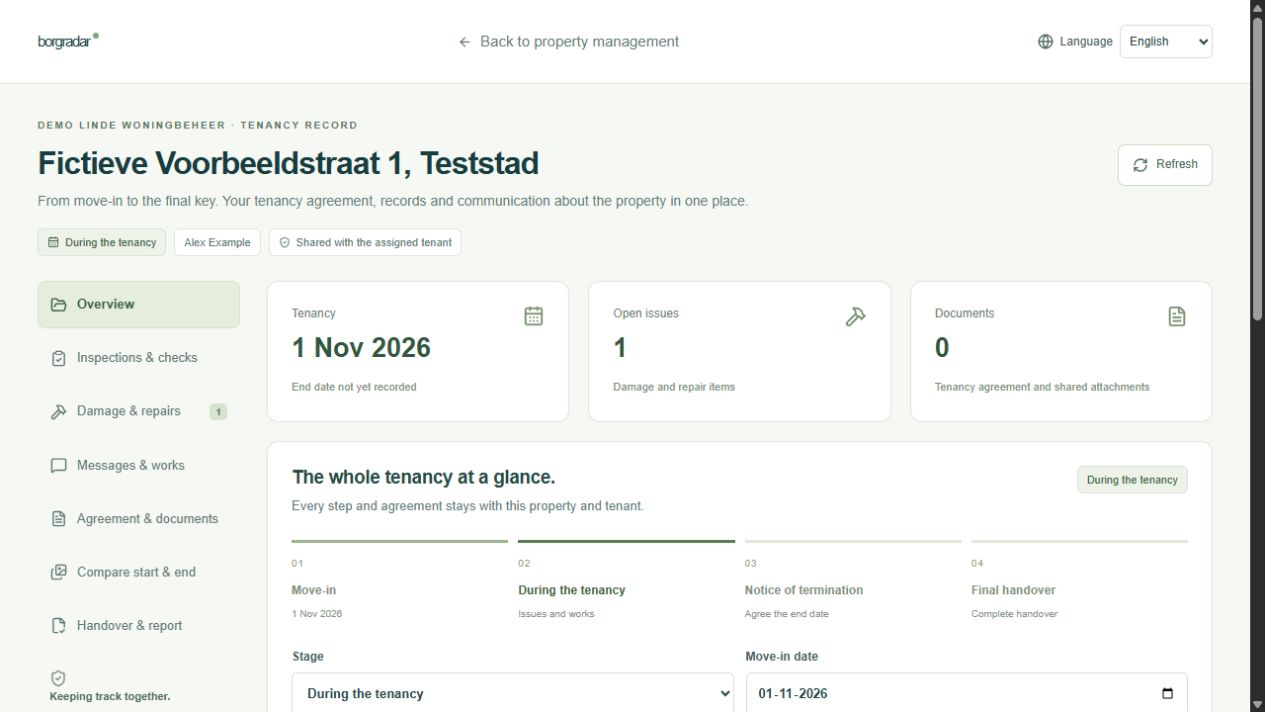
For the move-in inspection, day-to-day questions
and a careful handover.
The tenancy agreement and shared PDF documents linked to the right property and tenancy.
Your own checklists, required photos and a comparison of the initial and final condition.
An issue, photo and reply are stored together. New notifications appear within BorgRadar.
Announce work and record who is responsible for each repair task and when it should be completed.
Record readings, quantities, photos and additional arrangements at move-in and move-out.
Fixed report versions to which the landlord and tenant can add a confirmation or comment.
The tenant reports the problem and adds a photo. Your property manager responds, records a repair task and assigns responsibility. Once repaired, the completion record stays with the issue.
Illustrative example“The tap keeps dripping.” With a photo of the situation.
The question and arrangements are linked to the same issue.
Owner, target date and progress recorded with the repair task.
A retrievable history linked to the property and tenancy.
Manage properties and files from your own business workspace. Decide who gets access and use a new file for every tenant and tenancy.
Discuss your workflow with usAn individual login for each team member. Inspectors and readers work with the files you assign to them.
Import properties from CSV or Excel (XLSX). Review the preview and skip duplicate rows.
Choose a fixed access period or ongoing access during the tenancy. Close access when the tenancy ends.
Your own inspection templates, in-app notifications and your company name and logo on new reports.
We are happy to explain.
For property managers, rental organisations and landlords who want to keep records and communication together for each property and tenancy.
Your company creates a file and shares a personal invitation link with the tenant. You decide when access begins and, if applicable, ends. The tenant can access the assigned file.
First create the handover report and record the responses. Tenant access is withdrawn when the tenancy ends. Your company retains access to the file and its history. Create a new file for the next tenant.
Choose from four plans: Small with 20 properties for €99 per month, Medium with 50 for €179 per month, and Large with 100 for €299 per month. Pro is a tailored plan from €399 per month. All prices exclude VAT. Additional property capacity and your organisation's arrangements are agreed in advance.
We are happy to show you how a tenancy record works and discuss your workflow. Choose Small, Medium, Large or Pro; we confirm your company's arrangements in a no-obligation quotation.
Request a demonstration or quotation info@borgradar.nlForward this brochure to a colleague or download the PDF for your meeting.
Download the PDF brochure